Stickers3 min readFreeUpdated 2026-11-12
How to make a Telegram sticker pack from photos
Make the stickers on the site, then add them by hand in Telegram’s own @Stickers bot in about five minutes. Every rule checked in November 2026.
By Paletoo’s designers · every step done in Paletoo

The short answer
Make the stickers on Paletoo’s sticker maker and press Download PNGs: they come cut out, rimmed and exactly 512 px on one side, as Telegram wants. Then add them in Telegram’s own @Stickers bot: /newpack, a name, each PNG sent as a file with an emoji, /publish — about five minutes for a pack of ten.
What Telegram takes
Telegram has three kinds of sticker. Static: a PNG or WebP with one side exactly 512 px and the other up to 512. Video: a WEBM (VP9) without sound, up to 3 seconds and 256 KB. Animated: a TGS (Lottie) on a 512 × 512 canvas, up to 64 KB. Custom emoji are the same at 100 × 100.
A static pack holds up to 120 stickers. Everything Paletoo makes is static — photos with a rim and a caption — and fits the static rules exactly.
Make the stickers before you open Telegram
Telegram does not cut photos out, frame them or add captions; @Stickers takes finished files. So do the making first: cut-outs with a white rim (it keeps a sticker readable on Telegram’s dark themes) and short captions, in one style across the pack.
Ten stickers made together take a couple of minutes on the site. Add the ones that answer the messages you get most often.
Emoji, the icon and the link
Every sticker needs at least one emoji: Telegram offers the sticker when someone types that emoji, so give «👍» to a yes and «😂» to a laugh. The pack’s icon is a 100 × 100 picture, or the first sticker if you skip it.
The short name you choose becomes the pack’s link, t.me/addstickers/name, and stays: pick it with care. Anyone with the link can add the pack.
Made with Paletoo
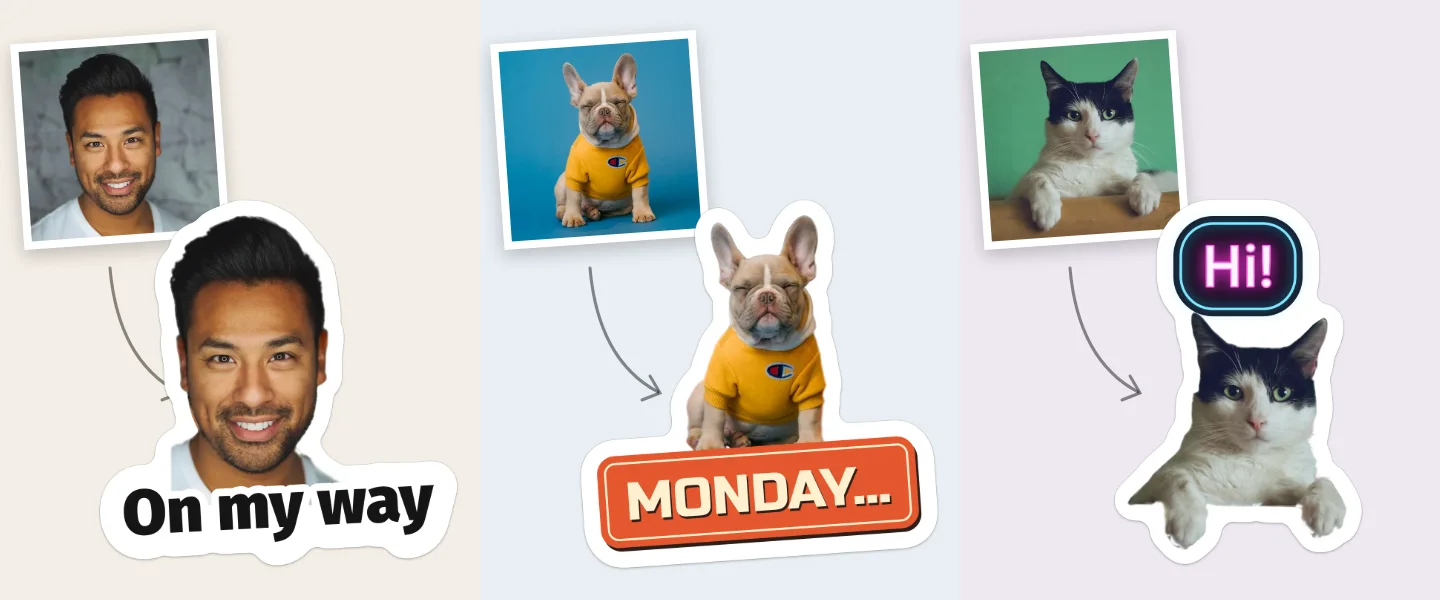
Each pair is a photo and the sticker our engine made of it, as it downloads: 512 × 512, a transparent background.
Make the whole pack on the site
Open the sticker maker and press Choose photos — up to 30 at once.
Let each one cut out on your device; type a caption under each.
Pick one style in Style for all and keep White rim on for dark chat themes.
Press Download PNGs and unzip the file: the
512folder holds Telegram’s files.
Add the pack to Telegram
Telegram keeps sticker packs in your account, so a pack you add on the phone is on every device. Two ways, both free; checked 11 November 2026.
A By hand in @Stickers: five minutes
- On the sticker maker press Download PNGs and unzip: the
512folder holds the files Telegram wants (PNG, one side exactly 512). - In Telegram open @Stickers (Telegram’s own bot) and send
/newpack, then the pack’s name. - Send the first PNG as a file (not as a photo, which loses the transparent edge), then one or more emoji for it.
- Repeat for each sticker, then send
/publish; send/skipfor the icon (or a 100 × 100 picture), then a short name for the pack’s link. - Open the link the bot sends and tap Add stickers. Later:
/addstickeradds more,/delstickerremoves one.
Share a pack by its link, t.me/addstickers/name: anyone who opens it can add it.
Questions
How many stickers can a Telegram pack hold?
Up to 120 in a sticker pack and up to 200 in a custom emoji set (Bot API 10.4, November 2026). A bot can add up to 50 at once when it creates the pack.
What size is a Telegram sticker?
A static sticker is a PNG or WebP with one side exactly 512 px and the other up to 512. Video stickers are WEBM up to 256 KB and 3 seconds; animated TGS up to 64 KB. All sizes in one table.
Why did my sticker lose its transparent background?
It was sent to @Stickers as a photo, which Telegram compresses to a JPEG. Send the PNG as a file (in the attachment menu choose File) and the transparent edge stays.
Can I make video or animated Telegram stickers here?
No — Paletoo makes static stickers only. Video stickers are made in a video editor as a 3-second WEBM and added with /newvideo in @Stickers.
Can I change a pack later?
Yes. In @Stickers, /addsticker adds stickers to a pack you made and /delsticker removes one; the link stays the same.
Do I need Telegram Premium?
No. Making and using sticker packs is free. Only custom emoji sets need Premium to be used in messages.
Make it online
Read next
- 01
 How to make stickers from your photosCut the subject out, give it a white rim and a short caption, keep one style for the set — then add the pack to WhatsApp or Telegram. Try it on this page.
- 02
 How to make WhatsApp stickers from your photosMake the whole pack once — cut out, rimmed, captioned, in WhatsApp’s own format — then add it on Android, iPhone or WhatsApp Web. Exact steps, checked in November 2026.
- 03
 Sticker sizes for every app: the cheat sheetWhatsApp, Telegram, Signal, Discord and iMessage in one table you can filter by app, a file checker that reads your stickers on the device, and the one safe size.
- 04
 How to make a transparent PNG for free: a logo, words or a cut-out photoA logo, a line of words or a cut-out photo that sits on anything — no white box, no watermark, on a computer or a phone.