Stickers3 min readFreeUpdated 2026-11-12
Sticker sizes for every app: the cheat sheet
WhatsApp, Telegram, Signal, Discord and iMessage in one table you can filter by app, a file checker that reads your stickers on the device, and the one safe size.
By Paletoo’s designers · every step done in Paletoo

The short answer
Make every sticker 512 × 512 px with a transparent background. As a WebP under 100 KB it fits WhatsApp exactly; Telegram wants one side of exactly 512 (PNG or WebP); Signal shows stickers at 512 and takes up to 300 KB; Discord is the odd one out at 320 × 320 and 512 KB. Packs: WhatsApp 3 to 30, Telegram up to 120, Signal up to 200. Animated stickers have their own formats in each app.
Why 512, and why exactly
512 px is the side the apps draw a sticker at on the sharpest phones, so every app settled near it. WhatsApp is strict — exactly 512 × 512, nothing else imports — while Telegram only needs one side of 512, so a tall or wide sticker is fine there.
Make the square anyway: one 512 × 512 file with a transparent background works in WhatsApp, Telegram and Signal alike, and a 1024 PNG of the same sticker is there for print.
The weight: 100 KB is the line that bites
A photo sticker saved as PNG easily weighs 200–400 KB. WhatsApp refuses anything over 100 KB in a pack, so save stickers as WebP, which keeps the transparent edge at a fraction of the weight. Telegram sets no limit for static stickers made in @Stickers; Signal allows 300 KB; Discord 512 KB.
The sticker maker shrinks each WebP until it is under 100 KB and only then lets it into the WhatsApp pack. The checker below shows the bytes of any file before you upload it.
Animated stickers: what each app wants
Every app has its own moving format. Telegram: WEBM (VP9, no sound, up to 3 s, 256 KB) or TGS vector animation (up to 3 s, 64 KB). WhatsApp: animated WebP, up to 500 KB and 10 seconds, and a pack is all animated or all static. Signal: APNG up to 3 s; no GIF. Discord: APNG.
Paletoo makes static stickers only, for every app; the table says so on its own row.
Made with Paletoo
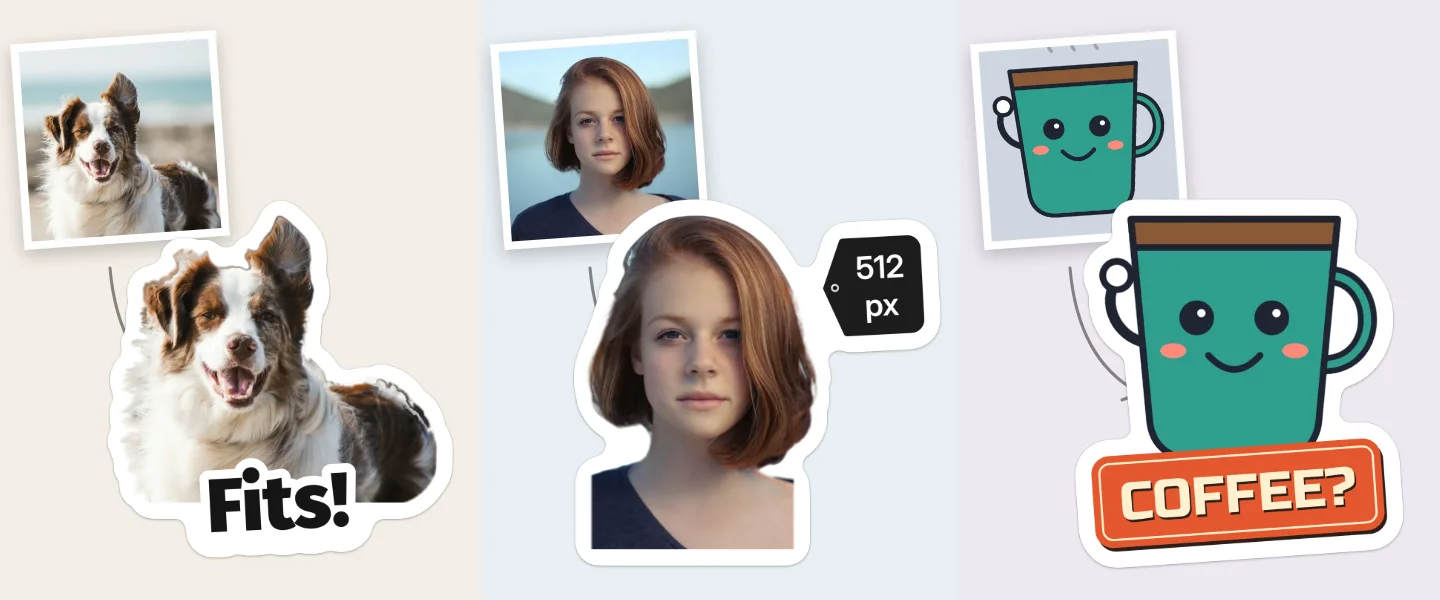
Each pair is a photo and the sticker our engine made of it, as it downloads: 512 × 512, a transparent background.
Make the whole pack on the site
Open the sticker maker and press Choose photos.
Write the captions and pick one style in Style for all.
Take the pack: WhatsApp (a ZIP for a sticker app) or Download PNGs (for Telegram, Signal and anywhere else).
Drop the files into the checker on this page to see each one’s size and weight against the app you chose.
Every app’s rules in one table
| App | Kind | Format | Size, px | File | Pack and notes |
|---|---|---|---|---|---|
| Telegram | Static sticker | PNG or WebP | One side exactly 512, the other up to 512 | not stated | Up to 120 a pack |
| Telegram | Video sticker | WEBM (VP9), no sound | One side exactly 512 | Up to 256 KB | Up to 3 s, 30 fps, looped |
| Telegram | Animated sticker | TGS (Lottie) | 512 × 512 canvas | Up to 64 KB | Up to 3 s, 60 fps |
| Telegram | Custom emoji | PNG, WebP, WEBM or TGS | 100 × 100 | as stickers | Up to 200 a set; using them needs Premium |
| Telegram | Pack icon | WebP or PNG | 100 × 100 | Up to 128 KB | Optional: the first sticker otherwise |
| Static sticker | WebP | Exactly 512 × 512 | Up to 100 KB | 3 to 30 a pack | |
| Animated sticker | Animated WebP | Exactly 512 × 512 | Up to 500 KB | Up to 10 s; all of a pack animated | |
| Tray icon | PNG | 96 × 96 | Up to 50 KB | One a pack (sticker apps) | |
| Signal | Sticker | PNG or WebP; APNG animated | Shown at 512 × 512 | Up to 300 KB | Up to 200 a pack; animation up to 3 s; no GIF |
| Discord | Server sticker | PNG or APNG | Exactly 320 × 320 | Up to 512 KB | 5 slots a server, more with boosts |
| iMessage | Sticker from a photo | made in Photos | set by the phone | — | iOS 17 or later: touch and hold the subject → Add Sticker |
| Paletoo | What the sticker maker gives | WebP pack (ZIP), PNG (ZIP), or straight to Telegram | 512 × 512; PNG also 1024 | WebP under 100 KB | Up to 30 at once; static only |
Sources: Telegram: Stickers · Telegram Bot API 10.4: Stickers · WhatsApp Help Center: custom stickers · WhatsApp: sticker app requirements · Signal Support: Stickers · Discord: custom stickers · Apple: Send stickers on iPhone
Check your files before you upload
Questions
What is the best size for a sticker?
512 × 512 px with a transparent background. It is exactly what WhatsApp wants, it is what Telegram calls «one side 512», and Signal shows stickers at 512.
Why does WhatsApp say my sticker is too large?
Either the file is over 100 KB (a PNG photo often is) or it is not exactly 512 × 512. Save it as WebP at 512 × 512; the checker on this page tells you which rule it breaks.
Can a Telegram sticker be rectangular?
Yes. Telegram needs one side of exactly 512 px and the other up to 512, so 512 × 300 is fine. WhatsApp does not allow that.
What size is a Discord sticker?
Exactly 320 × 320 px, PNG or APNG, up to 512 KB. Every server has 5 sticker slots; boosts add more.
What size is the pack icon?
WhatsApp’s tray icon is a 96 × 96 PNG under 50 KB. Telegram’s is 100 × 100 (WebP or PNG, up to 128 KB) or the first sticker when you skip it.
Does Paletoo make animated stickers?
No, static only. The table lists each app’s animated formats so you know what a video tool has to produce.
Make it online
Read next
- 01
 How to make WhatsApp stickers from your photosMake the whole pack once — cut out, rimmed, captioned, in WhatsApp’s own format — then add it on Android, iPhone or WhatsApp Web. Exact steps, checked in November 2026.
- 02
 How to make a Telegram sticker pack from photosMake the stickers on the site, then add them by hand in Telegram’s own @Stickers bot in about five minutes. Every rule checked in November 2026.
- 03
 How to make stickers from your photosCut the subject out, give it a white rim and a short caption, keep one style for the set — then add the pack to WhatsApp or Telegram. Try it on this page.
- 04
 How to make a transparent PNG for free: a logo, words or a cut-out photoA logo, a line of words or a cut-out photo that sits on anything — no white box, no watermark, on a computer or a phone.