Stickers3 min readFreeUpdated 2026-11-12
How to make WhatsApp stickers from your photos
Make the whole pack once — cut out, rimmed, captioned, in WhatsApp’s own format — then add it on Android, iPhone or WhatsApp Web. Exact steps, checked in November 2026.
By Paletoo’s designers · every step done in Paletoo

The short answer
Make the whole pack once on Paletoo’s sticker maker: up to 30 photos, cut out, with a rim and a caption, saved in WhatsApp’s own format — 512 × 512 WebP stickers under 100 KB and a 96 px tray icon, in one ZIP. WhatsApp cannot import a pack from a website, so add it through a free sticker app on Android or iPhone, or one sticker at a time with WhatsApp’s own Create on the phone, the web or the desktop app.
WhatsApp’s own Create, or a whole pack
WhatsApp can now turn a photo into a sticker inside a chat (Create in the sticker tray) and group stickers into packs. That is fine for one or two. For a set of 10 to 30 that look like one family — the same rim, the same caption style, captions written in one go — making them together is faster and the result is consistent.
So make the set on the site, then use whichever way in suits your phone: a sticker app takes the whole ZIP, WhatsApp’s Create takes the PNGs one by one.
The files WhatsApp wants
For a pack: each sticker a WebP of exactly 512 × 512 px, at most 100 KB (animated ones up to 500 KB), and a 96 × 96 PNG tray icon under 50 KB; between 3 and 30 stickers. Most «sticker won’t add» errors are a file of 513 px, a JPEG renamed to .webp, or a photo of 300 KB.
The sticker maker writes exactly these files and shrinks a heavy photo until it fits. Check any pack — ours or not — in the checker below: it reads the files on your device.
Stickers with or without the white border
The white rim is what makes a cut-out look like a sticker, and it keeps it readable on WhatsApp’s dark wallpaper. If you want stickers without the white border, switch White rim off: the subject keeps only a soft shadow.
WhatsApp’s own Create adds an outline of its own too; with our PNGs it has nothing left to cut, so choose no outline there to keep the rim you made.
Made with Paletoo
Each pair is a photo and the sticker our engine made of it, as it downloads: 512 × 512, a transparent background.
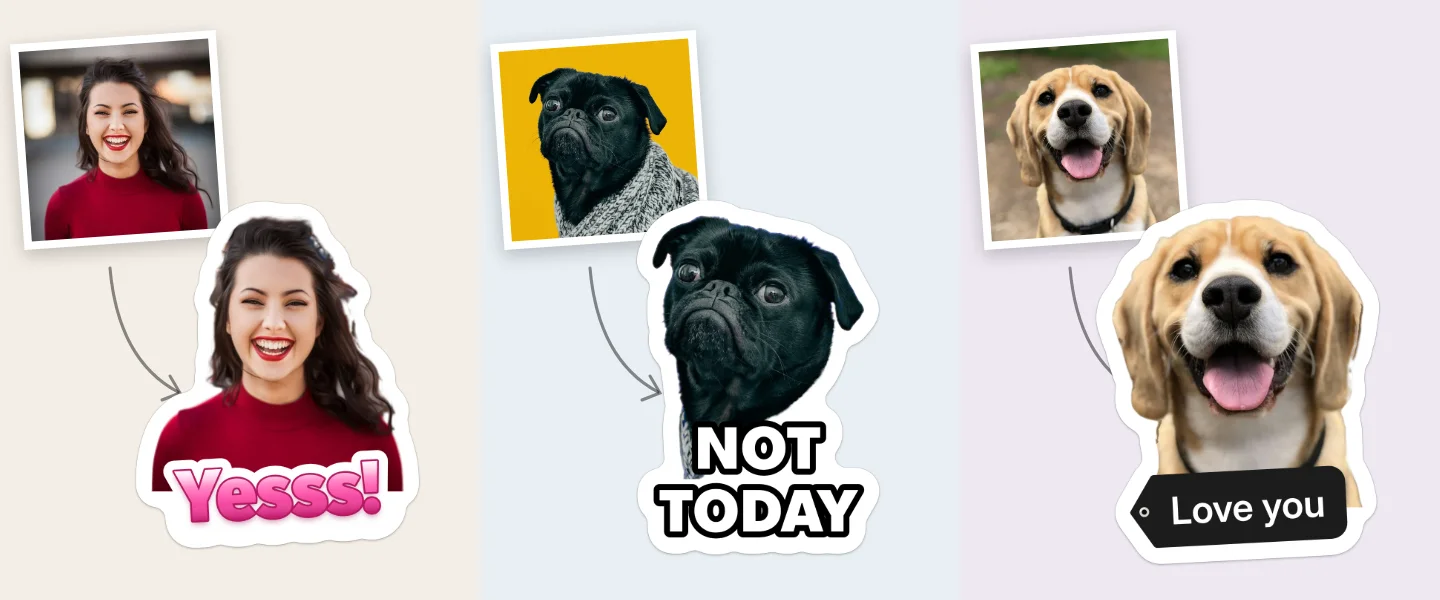
Make the whole pack on the site
Open the sticker maker and press Choose photos: at least 3, up to 30.
Let each photo cut out on your device; type a caption under each sticker.
Pick one style in Style for all; switch White rim off if you want stickers without the border.
Press WhatsApp: a ZIP with the stickers, the tray icon and the files sticker apps read lands in Downloads. For the one-by-one way, press Download PNGs.
Check your files before you upload
Add the pack to WhatsApp
WhatsApp cannot take a pack straight from a website, on any phone. Pick your way below; the menus are as of 11 November 2026 (WhatsApp Help Center). If you do not see Create or Add to sticker pack, update WhatsApp first.
A Android: the whole pack through a sticker app
- On the sticker maker press WhatsApp: a ZIP lands in Downloads with 512 × 512 WebP stickers, each under 100 KB, and a 96 × 96 tray icon.
- Install a free sticker app that opens WhatsApp packs, for example «Personal stickers for WhatsApp».
- Open the ZIP in that app (some apps want it unzipped into a folder first).
- Tap Add to WhatsApp, then Add. The pack appears in the sticker tab of every chat.
B iPhone: the whole pack through a sticker app
- On the sticker maker press WhatsApp and save the ZIP to Files.
- In Files, tap the ZIP once: it unzips into a folder of WebP stickers.
- Install a free sticker app such as «Sticker Maker», make a new pack in it and add the pictures from that folder (at least 3).
- Tap Add to WhatsApp. The pack opens in WhatsApp; tap Save.
C Any phone, no extra app: one sticker at a time
- On the sticker maker press Download PNGs and save the 512 px ones to your gallery.
- In a chat tap the emoji button, switch to stickers and tap Create; choose the PNG (Recents → See more → Photos).
- The PNG is already cut out: add nothing, or an emoji or text, and send it.
- Touch and hold the sticker in the tray → Add to sticker pack → New, give the pack a name and tap Save. Add the next ones to the same pack.
D WhatsApp Web or Desktop
- Open a chat, click the emoji button, then Stickers → Create.
- Choose a PNG from the sticker maker’s ZIP; the editor keeps its transparent edge.
- Send it. It stays in your stickers on the computer; on the phone, star it to keep it.
Want to share the whole pack? In a chat open stickers, tap ⋯ beside the pack and Send.
Questions
Why can’t I add the pack to WhatsApp straight from the site?
WhatsApp only imports sticker packs from an app on the phone (its sticker API on Android and iOS), never from a web page. A free sticker app opens the ZIP and hands the pack to WhatsApp; or add the PNGs one at a time with Create.
What size is a WhatsApp sticker?
Exactly 512 × 512 px as WebP, up to 100 KB static or 500 KB animated, with a 96 × 96 PNG tray icon; 3 to 30 stickers a pack. Every app in one table.
Does it work on iPhone?
Yes. Unzip the pack in Files and add the pictures in a sticker app such as Sticker Maker, or save the PNGs to Photos and use WhatsApp’s Create.
Can I make animated WhatsApp stickers here?
No — Paletoo makes static stickers only. An animated WhatsApp sticker is an animated WebP up to 500 KB and 10 seconds, and a pack must be all animated or all static.
Will my friends get the stickers?
Every sticker you send arrives in the chat, and they can tap it to save it. To give them the whole pack, open stickers, tap ⋯ beside the pack and Send.
Which sticker app should I use?
Any app that imports WhatsApp sticker packs can open the ZIP: it carries contents.json, the files most of them read. We have no tie to any of them; pick a well-reviewed one.
Make it online
Read next
- 01
 How to make stickers from your photosCut the subject out, give it a white rim and a short caption, keep one style for the set — then add the pack to WhatsApp or Telegram. Try it on this page.
- 02
 How to make a Telegram sticker pack from photosMake the stickers on the site, then add them by hand in Telegram’s own @Stickers bot in about five minutes. Every rule checked in November 2026.
- 03
 Sticker sizes for every app: the cheat sheetWhatsApp, Telegram, Signal, Discord and iMessage in one table you can filter by app, a file checker that reads your stickers on the device, and the one safe size.
- 04
 How to make a transparent PNG for free: a logo, words or a cut-out photoA logo, a line of words or a cut-out photo that sits on anything — no white box, no watermark, on a computer or a phone.