Free tools6 min readFreeUpdated 2026-11-12
Logo file formats explained: which files you need, and who gets which
One logo, seven files: what each is for, what to send a printer, a web developer or Instagram — and how to get all of them free.
By the Paletoo team · steps tested in Paletoo on
A logo needs a small set of files, not one: an SVG (vector, sharp at any size) for websites, sign makers and anything that scales; a PDF for print; a PNG with a transparent background for documents, slides and video; a square PNG on its colour for profile pictures; and a favicon with app icons for a website. Paletoo’s logo maker hands you that whole set in one ZIP, free, and the editor exports each file on its own.
This guide is the cheat sheet behind it. It explains what each format is, which one to send to a printer, an embroidery shop, a web developer or a social network, which colour versions a logo should come in, and why a JPG of your logo is almost never the right file. The steps were run in Paletoo on 12 November 2026 on «Lumen Studio», a photography logo from our logo set; the pictures are the editor itself.
The formats, in one table
Logo files come in two kinds. Vector files (SVG, PDF, the older EPS and AI) store the logo as shapes and curves, so a printer can blow it up to a shop sign and it stays sharp. Raster files (PNG, JPG, WebP) store pixels, so each has a size it looks good at and goes soft above it. A professional logo pack holds both: vectors to scale and print, pixels for the places that only accept a picture.
Transparency is the other line. PNG, WebP and SVG can have no background, so the logo sits on a photo or a coloured slide without a white box; JPG cannot. That is why «send me your logo» answered with a JPG so often ends in a white rectangle on a dark banner.
| File | What it is | Use it for | In the Paletoo logo pack |
|---|---|---|---|
| SVG | Vector, transparent, tiny file | Websites, sign makers, laser cutting, any size | Yes — the logo’s outlines, cut to the logo |
| Vector page, prints exactly | Printers, print shops, embroidery digitisers | From Export, with CMYK print if asked | |
| PNG, transparent | Pixels with no background | Word, Google Docs, slides, video, over photos | Yes — 2000 px across |
| PNG, on its colour | Pixels, square, filled | Profile pictures, posts, marketplaces | Yes — 2160 × 2160 px |
| favicon.ico + PNG icons | Small squares of the initial | Browser tab, home-screen and app icons | Yes — 16, 32, 48, 180, 192, 512 px |
| JPG | Pixels, no transparency | Only photos of the logo in use (a sign, a mug) | No — not a logo file |
| EPS / AI | Older vector formats | Printers who still ask for them | No — send PDF or SVG, which they open |
Colour versions: full colour, one colour, white
Each file should exist in at least three colourways. The full-colour version is the logo as designed. A one-colour version (usually black) is for stamps, receipts, newspaper ads, engraving and a fax that somebody still sends. A reversed version (white) is for dark photos and dark backgrounds — on a black T-shirt the full-colour logo often disappears. Many brands add a fourth: the logo on its own coloured square, for avatars.
Colour itself is written in different systems. Screens use RGB, written as a HEX code such as #1E3A5F. Print uses CMYK, the four inks of a press. Some brands also name a Pantone ink so a printer mixes exactly that colour. Write all three into your brand notes once and nobody has to guess. In Paletoo the PDF export has a CMYK print option (PDF/X-4 with an approximate profile — the printer’s own profile is always better), and the Proof colours (CMYK) command shows roughly how the colours will print.
What to send whom: the cheat sheet
A web developer gets the SVG for the site header (it is one small file and sharp on every screen) and the icons for the browser tab and the home screen. Google Search shows a site’s favicon next to its results: Google asks for a square of at least 8 × 8 pixels, recommends larger than 48 × 48, and reads ICO, PNG, JPEG, GIF, BMP, PPM or TIFF — not SVG — so the favicon.ico and PNG icons in the pack are the ones to give it. A web app manifest wants a 192 and a 512 px icon; an iPhone home screen uses a 180 px apple-touch-icon.
A printer gets a PDF (or the SVG), never a PNG off a website. An embroidery or T-shirt shop gets the one-colour vector: they turn it into stitches or screens themselves, and fine hairlines under about 1 mm will be thickened or dropped. Social networks get the square PNG; they crop it to a circle, so keep the logo inside the middle 80 %. For an email signature a PNG is still the safe file: SVG in mail apps is supported far more widely than it was, but unevenly — Gmail, for one, turns an SVG into a PNG. Make that PNG twice the size it shows at (300 × 100 px for a 150 × 50 signature) so it stays crisp.
Made in Paletoo
Every picture on this page was made in Paletoo — these three with the same steps on other templates:


Make it free in Paletoo
Start from the logo maker and type your brand name, or press “Open in Paletoo” on this page to open «Lumen Studio» as your own document. The Layers panel lists the name, the ring of small capitals and the frame.
Double-click the name and type your own; change the font and size under Typography in the Design tab. Everything you change here goes into every file you export, so finish the logo first.
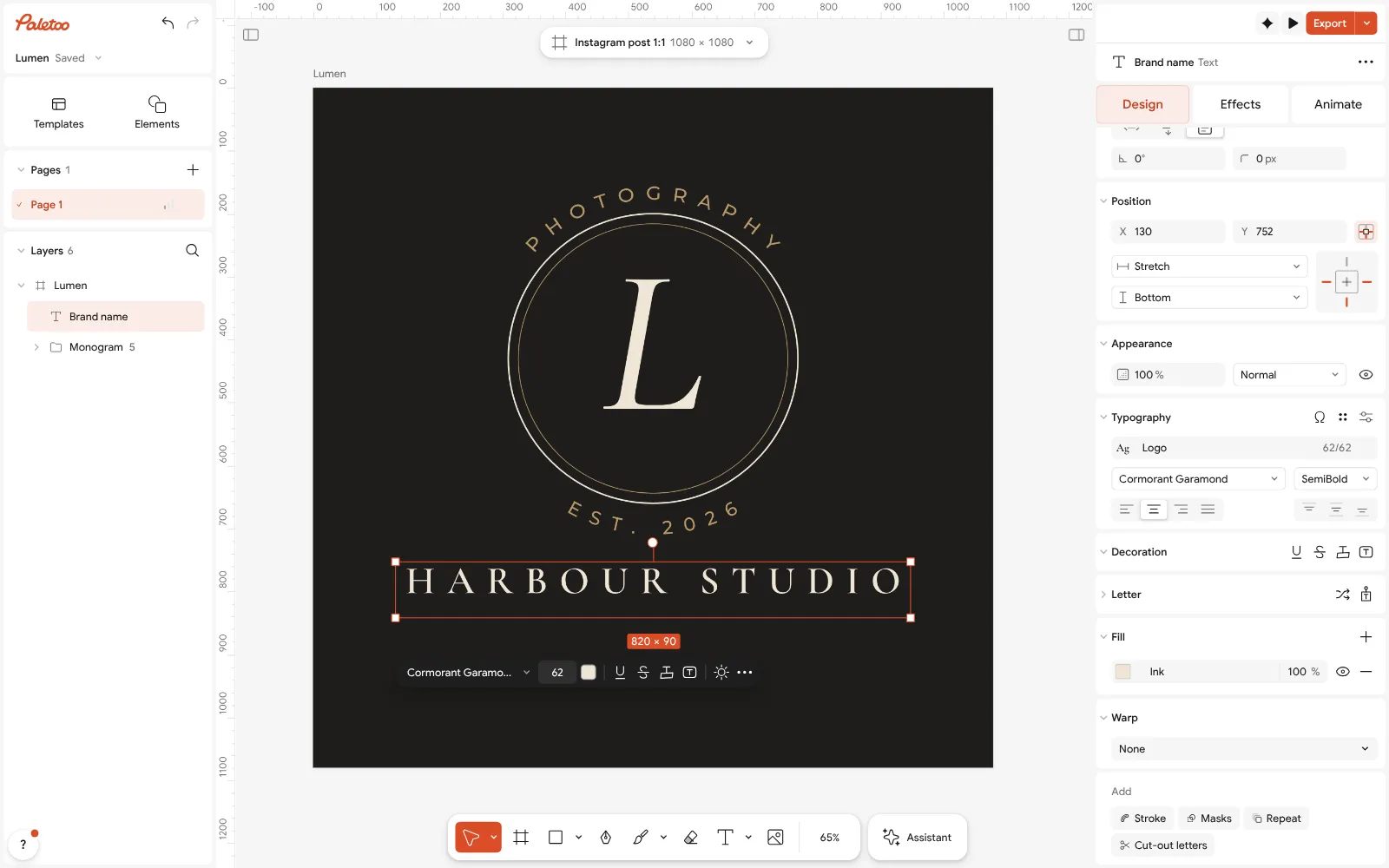
The Lumen Studio logo open in Paletoo, renamed «Harbour Studio»: the name selected, its font and size under Typography Make the one-colour version: press Ctrl A to select everything and set one ink under Selection colours. For a white version, use Duplicate artboard first and recolour the copy, so all the versions live in one document.
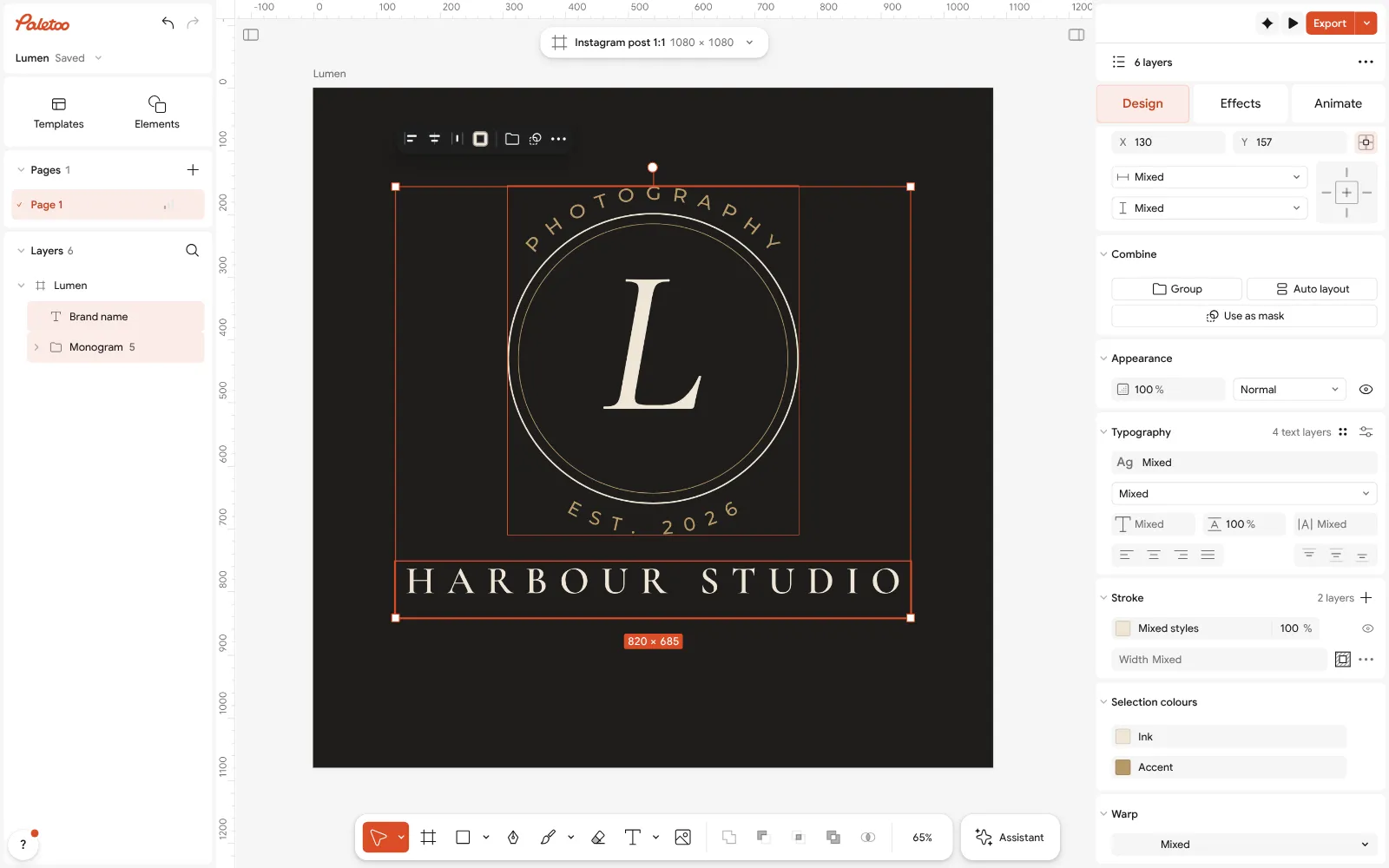
Everything selected: the logo’s inks under Selection colours — one change makes the one-colour version Press Export (Ctrl Shift E) and choose SVG: the logo is written as real outlines, cut to the logo, with no background. This is the file for a website, a sign maker or anyone who will scale the logo.
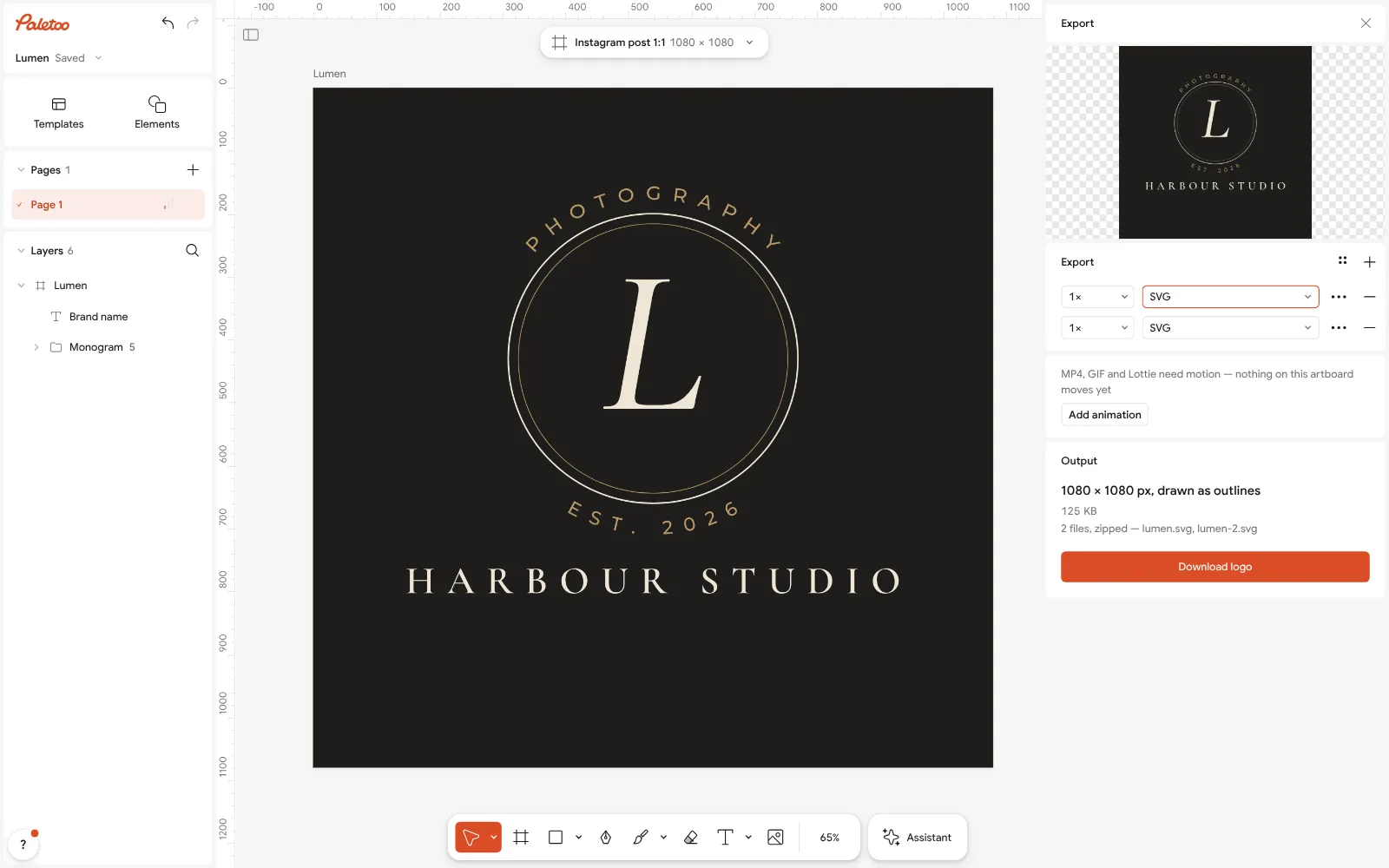
Export as SVG: real outlines, cut to the logo, no background — the file a website or a sign maker wants For a printer, choose PDF in the same window; under Export settings pick CMYK print if the print shop asks for CMYK. For documents and video, choose PNG and set Background to Transparent, at 2× or a typed width.
Back in the logo maker, «Download logo pack» gives all of it in one ZIP: the SVG, the transparent PNG, the square PNG on its colour, favicon.ico and the app icons. On an iPhone, the two PNGs go to Photos and the ZIP with the SVG is under the arrow beside the button.
Make it your own
Keep a «Logo files» page in the same document: one artboard per colour version, named «full colour», «black», «white». Duplicate artboard makes each in a second.
If a printer’s software cannot read your fonts, the SVG and PDF from Paletoo already carry the letters as outlines; for an editable SVG later, keep the .mdtools file — that is your master.
Check a print PDF before sending it with Proof colours (CMYK): a bright RGB green or orange that turns dull in the proof will turn dull on paper too.
Sources
- Scalable Vector Graphics (SVG) 2 — W3C
- Portable Network Graphics (PNG) Specification, Third Edition — W3C
- Define a favicon to show in search results — Google Search Central (updated 27.10.2026)
- Add a web app manifest — web.dev
- SVG image format in email clients — Can I email
- What is free in Paletoo — Pricing
Questions
What file format should a logo be?
Keep the master as a vector — SVG or PDF — and export pictures from it: a transparent PNG for documents and video, a square PNG for profiles, and favicon icons for a website. A JPG alone is not enough.
What logo files do I need to send to a client?
SVG and PDF (vector), a transparent PNG and a PNG on its colour, each in full colour, one colour and white, plus favicon and app icons. Paletoo’s logo maker gives the main set as one ZIP.
What format should a logo be for printing?
PDF or SVG, because they are vectors and print sharp at any size. If the print shop asks for CMYK, export the PDF with CMYK print, and ask for their colour profile.
What is the best logo format for a website?
SVG for the logo on the page — small and sharp on every screen — and favicon.ico with PNG icons (180, 192 and 512 px) for the browser tab, the home screen and Google results.
Is PNG or SVG better for a logo?
SVG for anything that scales or gets printed; PNG where only a picture is accepted — Word, slides, video editors, social networks. Most people need both, which is why logo packs contain both.
Can I get my logo as SVG for free?
Yes. Paletoo’s logo maker and the editor’s Export both write SVG free, with no watermark and no account. Canva lists SVG download among its paid features.
Make it online
- Logo makerType your brand name, pick a logo, try fonts, colours and layouts, then download SVG, PNG and app icons — free, no watermark, no sign-up.
- Image to vector converterTurn a PNG or JPG logo, icon or drawing into a clean SVG in about 30 seconds — free, no sign-up, and your picture never leaves your browser.
- Business card makerDesign a business card at the exact print size, add a QR code that really scans, and export a PDF the printer accepts.
Free design templates for posts, stories and posters: Brand guidelines templates · Contact and call-to-action templates
Try it on your own design
Paletoo opens in your browser, with no sign-up. Every effect here is live: change the picture or the words and the effect follows.
Open in PaletooOpens this design as your own copy — every layer and effect editable, free.
Read next
- 01
 How to make a transparent PNG for free: a logo, words or a cut-out photoA logo, a line of words or a cut-out photo that sits on anything — no white box, no watermark, on a computer or a phone.
- 02
 How to edit an SVG online for free — on a computer or a phoneOpen the file, recolour it, retype it, move the parts — and save it back as an SVG, with nothing to install.
- 03
 Brand book: what it is, what goes in it, and a free templateThe rules of your logo, colours, fonts and voice in one PDF — so a printer, a designer or a new colleague gets the brand right the first time.