Stickers3 min readFreeUpdated 2026-11-27
Birthday and wedding stickers from your photos
A sticker pack for the guests’ chat: the hero of the day, the couple, the date and the inside jokes — made before the party, shared in one link. Try a caption here.
By Paletoo’s designers · every step done in Paletoo

The short answer
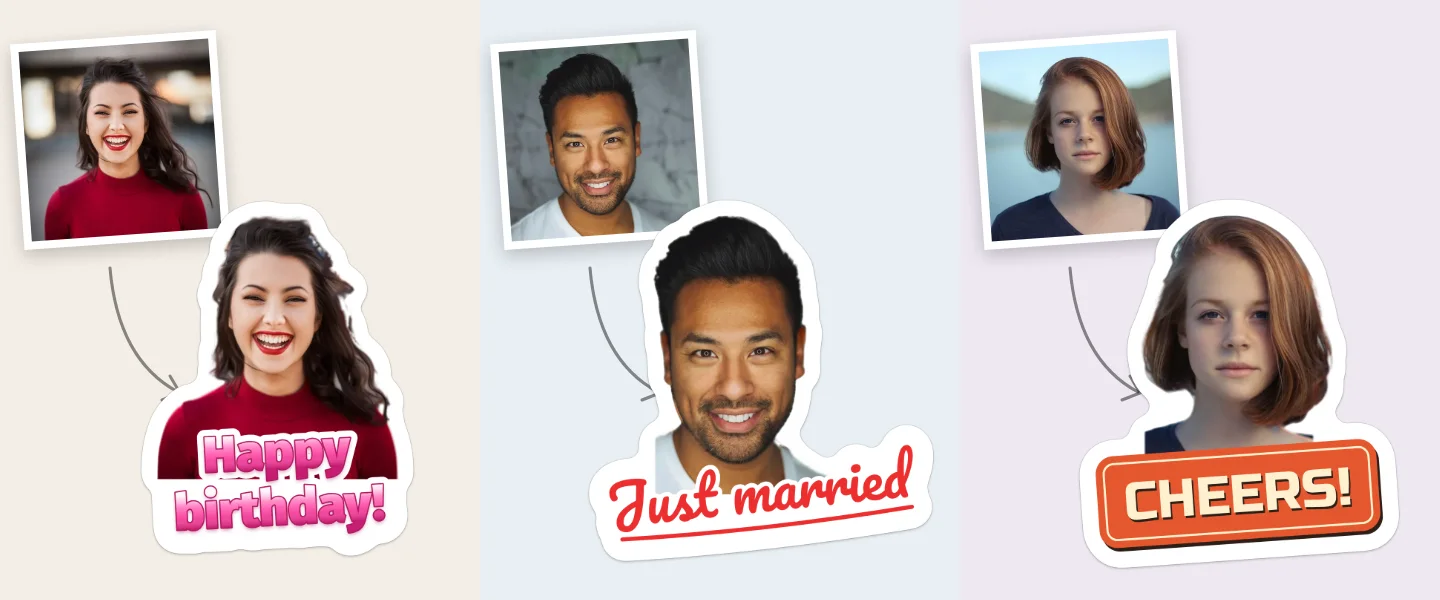
Make 8 to 15 stickers of the birthday star or the couple from photos you already have — each cut out, with a white rim and a caption: the name, the date, «Cheers!», the inside joke. Do it a few days before, on Paletoo’s sticker maker, in one festive style, and share the pack in the guests’ chat so everyone can use it on the day.
Plan the pack around the day
Guests use stickers to react: the toast, the first dance, the cake, the late taxi. So write the captions first — «Happy birthday!», «Just married», «Cheers!», «Cake time», «Where’s the taxi?» — then choose a photo for each.
Put the name or the date on two or three of them: «Anna 30», «12.06». Those are the ones people keep after the party.
Photos you already have work best
You do not need a shoot: old photos, holiday selfies and baby pictures of the birthday star all cut out well if the face is clear. A funny old photo with a new caption is the sticker that gets sent the most.
Make the set in one style — Retro for a vintage wedding, Puffy 3D or Neon for a party, Marker for a handwritten feel — so it looks like it was made for the day.
Share it before the party
Send the pack a day before so guests have it ready. Ask the people in the photos first: a sticker can be forwarded beyond the party.
On the day, the pack becomes the chat’s own language — and a keepsake afterwards.
Made with Paletoo
Each pair is a photo and the sticker our engine made of it, as it downloads: 512 × 512, a transparent background.
Make the whole pack on the site
Open the sticker maker and press Choose photos: pick the photos of the birthday star or the couple.
Write the captions — names, the date, the toast — under the stickers.
Pick one festive style in Style for all.
Take the pack: WhatsApp (a ZIP for a sticker app) or Download PNGs (for Telegram, Signal and anywhere else).
Add the pack to WhatsApp
WhatsApp cannot take a pack straight from a website, on any phone. Pick your way below; the menus are as of 11 November 2026 (WhatsApp Help Center). If you do not see Create or Add to sticker pack, update WhatsApp first.
A Android: the whole pack through a sticker app
- On the sticker maker press WhatsApp: a ZIP lands in Downloads with 512 × 512 WebP stickers, each under 100 KB, and a 96 × 96 tray icon.
- Install a free sticker app that opens WhatsApp packs, for example «Personal stickers for WhatsApp».
- Open the ZIP in that app (some apps want it unzipped into a folder first).
- Tap Add to WhatsApp, then Add. The pack appears in the sticker tab of every chat.
B iPhone: the whole pack through a sticker app
- On the sticker maker press WhatsApp and save the ZIP to Files.
- In Files, tap the ZIP once: it unzips into a folder of WebP stickers.
- Install a free sticker app such as «Sticker Maker», make a new pack in it and add the pictures from that folder (at least 3).
- Tap Add to WhatsApp. The pack opens in WhatsApp; tap Save.
C Any phone, no extra app: one sticker at a time
- On the sticker maker press Download PNGs and save the 512 px ones to your gallery.
- In a chat tap the emoji button, switch to stickers and tap Create; choose the PNG (Recents → See more → Photos).
- The PNG is already cut out: add nothing, or an emoji or text, and send it.
- Touch and hold the sticker in the tray → Add to sticker pack → New, give the pack a name and tap Save. Add the next ones to the same pack.
D WhatsApp Web or Desktop
- Open a chat, click the emoji button, then Stickers → Create.
- Choose a PNG from the sticker maker’s ZIP; the editor keeps its transparent edge.
- Send it. It stays in your stickers on the computer; on the phone, star it to keep it.
Want to share the whole pack? In a chat open stickers, tap ⋯ beside the pack and Send.
Add the pack to Telegram
Telegram keeps sticker packs in your account, so a pack you add on the phone is on every device. Two ways, both free; checked 11 November 2026.
A By hand in @Stickers: five minutes
- On the sticker maker press Download PNGs and unzip: the
512folder holds the files Telegram wants (PNG, one side exactly 512). - In Telegram open @Stickers (Telegram’s own bot) and send
/newpack, then the pack’s name. - Send the first PNG as a file (not as a photo, which loses the transparent edge), then one or more emoji for it.
- Repeat for each sticker, then send
/publish; send/skipfor the icon (or a 100 × 100 picture), then a short name for the pack’s link. - Open the link the bot sends and tap Add stickers. Later:
/addstickeradds more,/delstickerremoves one.
Share a pack by its link, t.me/addstickers/name: anyone who opens it can add it.
Questions
How many stickers should a party pack have?
Eight to fifteen: enough for every moment of the day without hunting through the pack. WhatsApp needs at least three and takes up to 30.
How do I share the pack with all the guests?
In Telegram, send the pack’s link (t.me/addstickers/…) that @Stickers gives you when you publish: everyone adds it in one tap. In WhatsApp, open stickers in the chat, tap ⋯ beside the pack and Send.
Can the stickers be animated?
Not here: Paletoo makes static stickers. They are what WhatsApp and Telegram show instantly even on a slow connection at the venue.
Can I print them for the party?
Yes: Download PNGs gives every sticker at 1024 px with a transparent background, for sticker paper or table cards.
Are the photos uploaded?
No. They are cut out and drawn in your browser, and the files are made there too.
Make it online
- Make stickers from photosPick a few photos and get a sticker pack: each one cut out with a white rim and a caption, for Telegram, WhatsApp or as PNG files — free, no sign-up.
- Remove background onlineCut the subject out of any photo in one click — on your own device, with no upload and no credits.
- Make a save the date onlineTell your guests the date: pick a save-the-date card, add your names and photo, and print it or send it to every chat — free, no sign-up, no watermark.
Read next
- 01
 How to make stickers of your face and friendsSelfie stickers that work as replies: the expressions to shoot, how to frame a face for a sticker, captions, and asking friends first. Try it with these portraits.
- 02
 How to make stickers from your photosCut the subject out, give it a white rim and a short caption, keep one style for the set — then add the pack to WhatsApp or Telegram. Try it on this page.
- 04
 How to turn your kids’ drawings into stickersPhotograph the drawing, cut it out of the paper, give it a rim and the artist’s name: a sticker pack the whole family will send. Try it with this crayon cat.