Techniques5 min readFreeUpdated 2026-11-12
Knockout text over a photo: 7 poster ideas
Seven ways to put a word over a photo so the photo makes room for it — each one live in the demo, each one a poster you can open and change.
By the Paletoo team · steps tested in Paletoo on
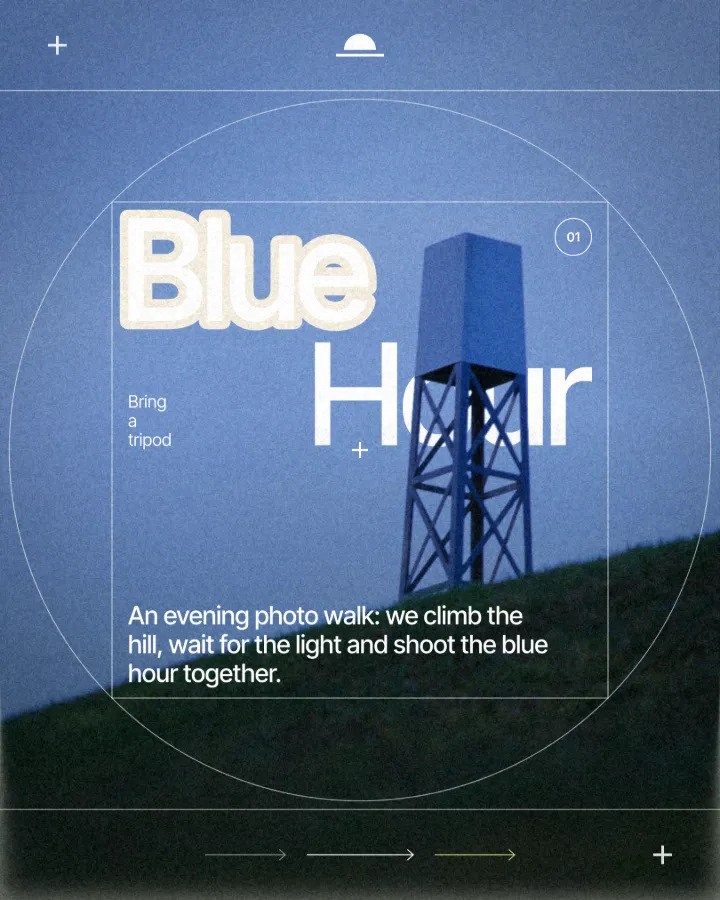
The quickest way to make text over a photo read is to cut the photo away round the letters: a knockout outline leaves a band of the background round every letter, so the word stands clear without a box, a shadow or a dark overlay. Below are seven poster ideas built on that one move, from the quiet paper margin to an echo of rings.
Each idea names the settings to use, and the demo under this paragraph lets you try it on your own word before you open the poster in the editor. Everything was made and checked in Paletoo on 11 November 2026; the pictures are real posters made in it.
Try it: your word, cut out of a photo
Type a word, drag it over the photo, and switch between a painted outline and a knockout. Knockout shows the background through the band — swap the background and the band follows.

Opens the poster with your word and these settings, as your own copy. Free, no sign-up.
1–3: the quiet ones — paper, sky and night
1. The paper margin. A cream or off-white background, a photo over it and a heavy word with a 4–6 % knockout. The band reads like the paper border of a screen print and calms a busy picture. It is the safest idea here: it works on almost any photo and with almost any colour of letters.
2. The cut through the sky. Put the word high on the poster, across the sky, and set the background to a deeper shade of the sky’s own blue. The band looks like the sky cut open, not like an outline; the word floats. Works best with a single heavy line and a photo whose top third is calm.
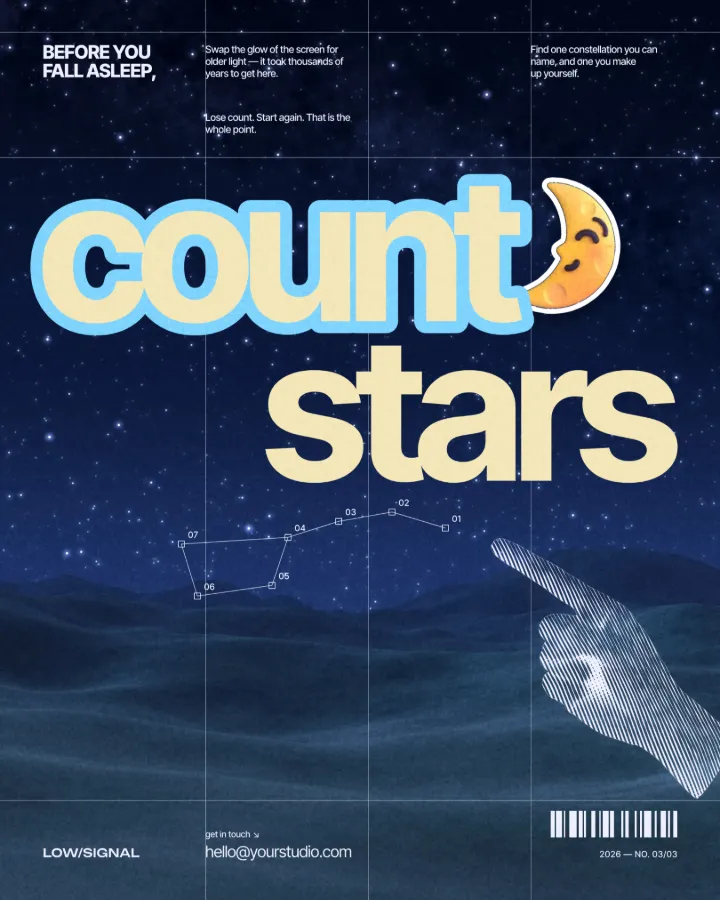
3. Night and a gradient. On a dark photo, let the band show a gradient from deep blue to a light cyan. A painted stroke on a night picture looks pasted on; a cut that shows a gradient looks lit from behind. Try the Night photo and the Sea background in the demo.
4–5: the loud ones — thick cuts and echoes
4. The thick sticker cut. Push the band to 10–12 % of the type size on a short word of three to six letters. The word turns into a die-cut sticker pressed onto the photo. Use it on event posters and sports announcements where the word must read across a street.
5. The echo. Two thin lines with a gap between them, both cutting through: the photo shows in the gap, so the word gets a halo of rings. It is the knockout version of the 70s concentric outline, and it reads as motion even on a still poster.
6–7: the clever ones — behind the subject and a cut that stops
6. The word behind the subject. Cut out the subject of the photo (a person, a tower, an animal) onto a layer above the headline, then give the headline its knockout. The band cuts the photo but not the subject, so the figure stands in front of the word with the band tucked behind it — a magazine-cover move that looks expensive.
7. The cut that stops. Lay a colour panel under the photo and set the knockout to reach only one layer: the band then shows the panel, not the page. Use a brand colour there and the band becomes a brand stripe round the letters on every poster in a series.
| Idea | Band width | Background | Best on |
|---|---|---|---|
| 1 Paper margin | 4–6 % | Cream, off-white | Any photo |
| 2 Cut through the sky | 5–8 % | A deeper blue | Calm skies |
| 3 Night and a gradient | 4–6 % | Blue to cyan | Dark photos |
| 4 Thick sticker cut | 10–12 % | Any light colour | Short words |
| 5 Echo | 2–3 % × 2, gap 3 % | Paper or black | Single words |
| 6 Behind the subject | 5–7 % | Paper | A clear subject |
| 7 The cut that stops | 5–7 %, 1 layer | A colour panel | A series |
Made in Paletoo
Every picture on this page was made in Paletoo — these three with the same steps on other templates:

Step by step in Paletoo
Open the poster: press “Open in Paletoo” on this page. It is a digital-detox post, “watch clouds” over a summer sky, with the knockout already on — the first idea, the paper margin.
Select the title and stay in the Design tab. In the text’s Stroke section press Add a stroke if there is none yet.
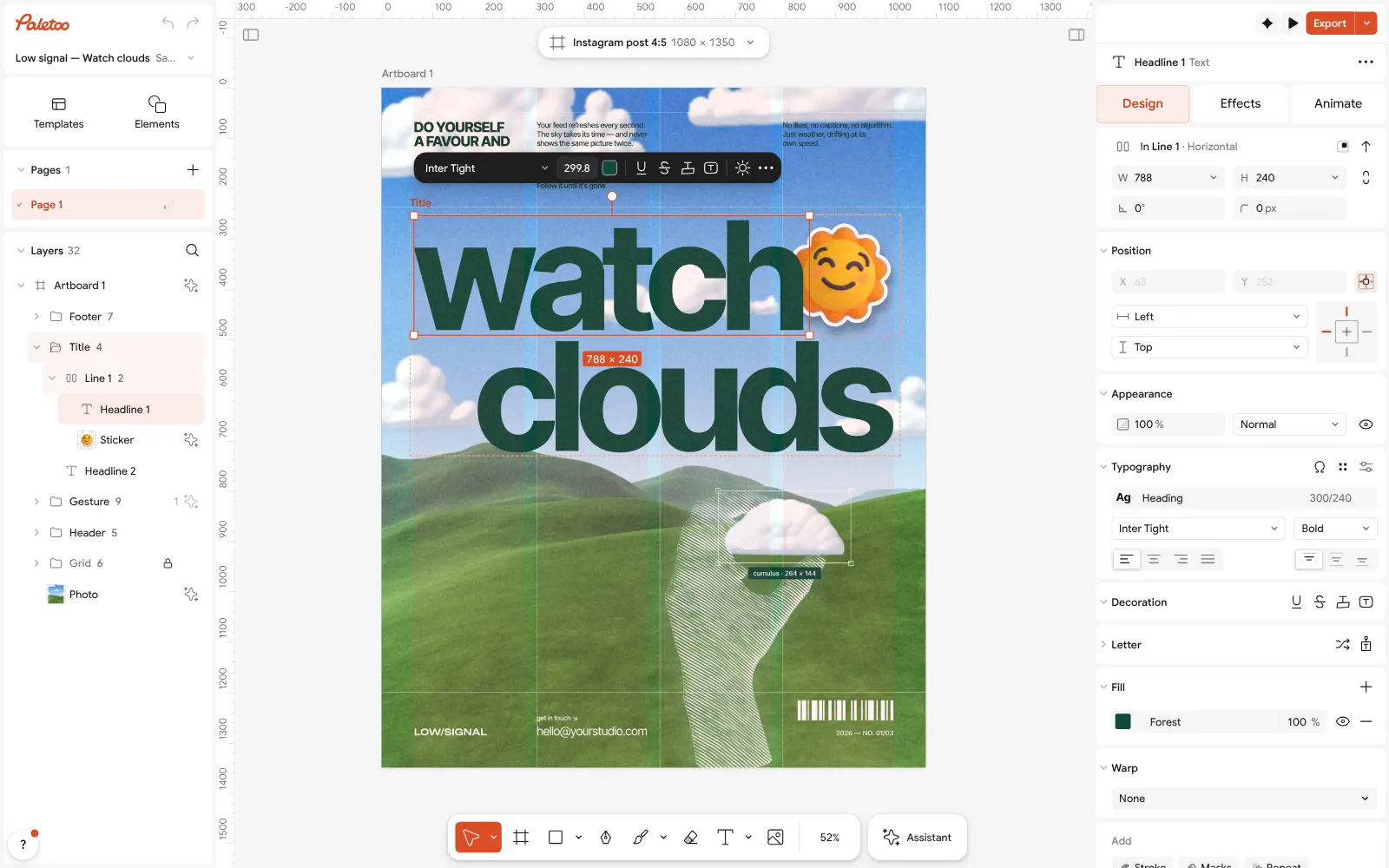
The “watch clouds” post open in Paletoo, its headline selected in the Design tab Press the knockout button in the stroke’s row (Cut through the layers below). The row shows Knockout, and the band round the title is cut through the photo down to the background.
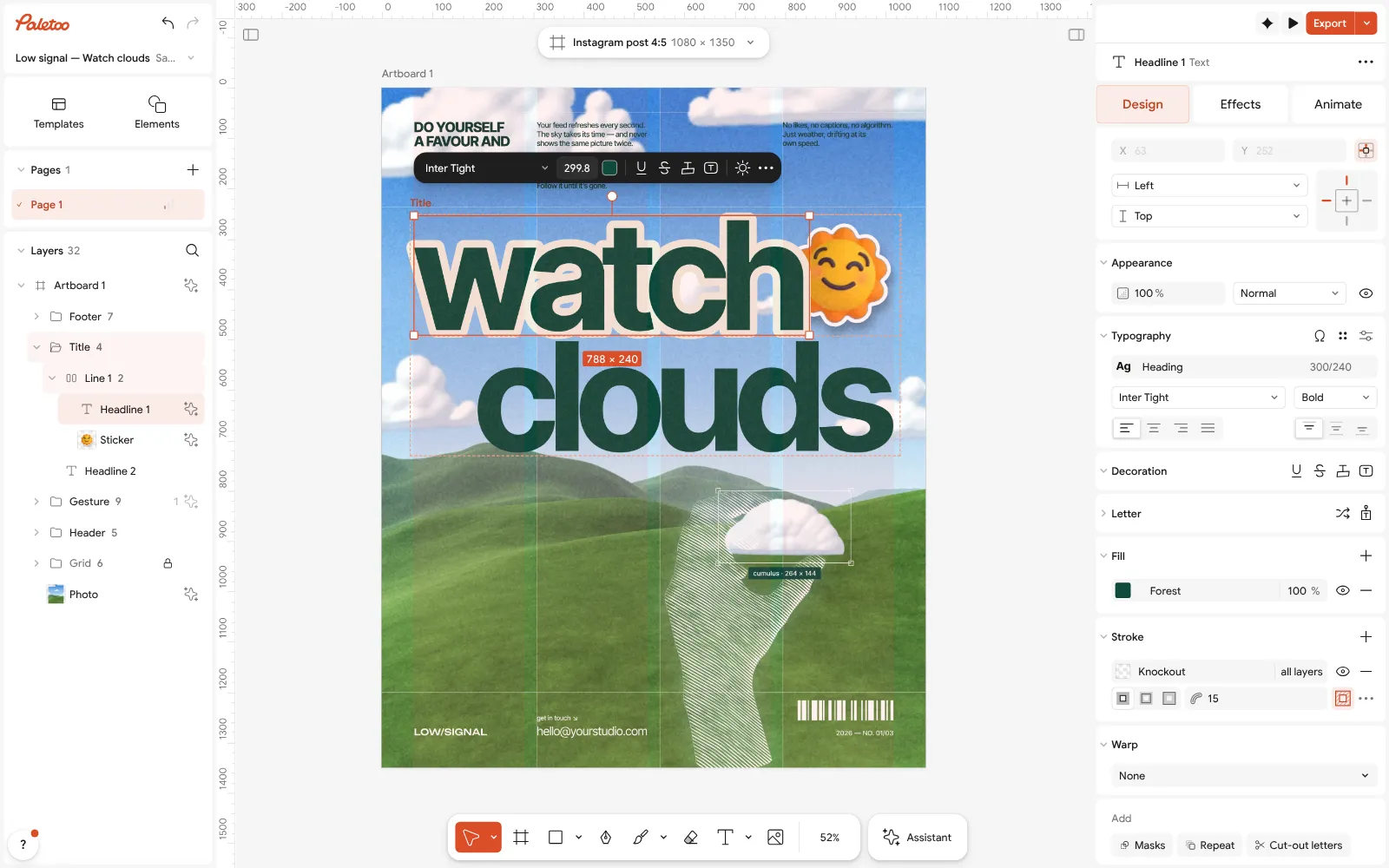
The knockout on: the Stroke section shows Knockout and the headline is cut out of the sky For idea 4, raise the stroke’s weight to 10–12 % of the type size. For idea 2 and 3, change the artboard’s background: a deeper blue for the sky, a two-colour gradient for the night.
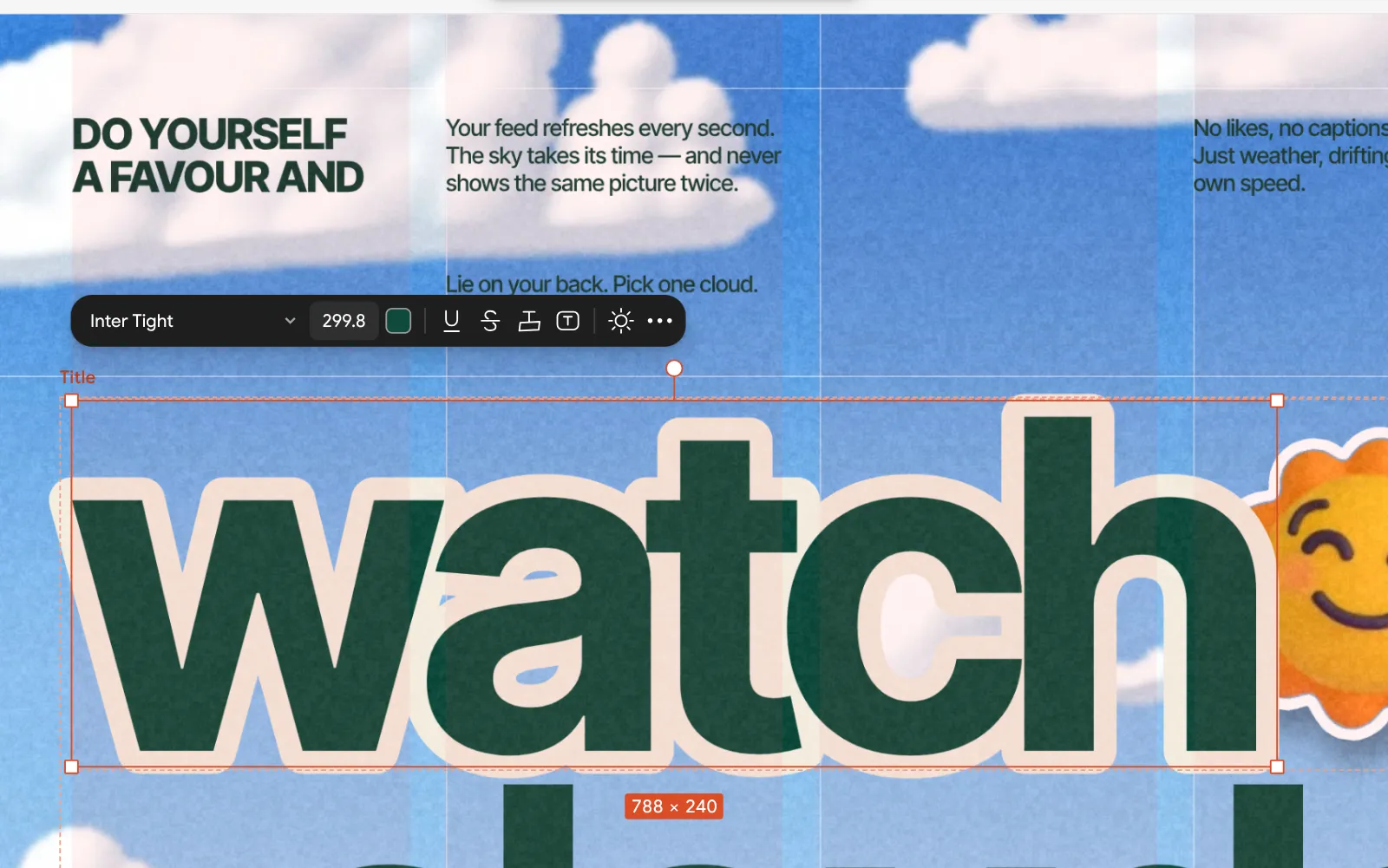
Close up: the band round “watch”, the paper background showing through the sky For idea 7, put a colour panel between the photo and the background and pick 1 layer in the stroke’s row instead of All layers: the band shows the panel.
Press Export (Ctrl Shift E) and choose PNG for a post, PDF for print. The cut is exported exactly as you see it, with no watermark.
Make it your own
Keep the photo’s busiest part away from the counters of the letters: drag the word until the band crosses calm areas, and the cut will look deliberate rather than accidental.
Pair a knockout with one photo treatment at most. A Halftone or a duotone on the photo and a clean knockout on the word is a classic print pairing; more than that turns into noise.
For a series of posters, keep the band width and the background the same on every one and change only the photo and the word: the knockout becomes the series’ signature.
Sources
Questions
How do I cut text out of an image online?
In Paletoo, put the text over the picture, add a stroke in Design › Stroke and press its knockout button. The band round the letters is cut through the picture; it is free and runs in the browser.
How wide should the knockout band be?
4–6 % of the type size for a clean margin, 10–12 % for a sticker look. Thin fonts need less, or the insides of the letters close up.
Can the cut show a colour instead of the page?
Yes. Put a colour layer under the photo and let the knockout reach one layer only: the band shows that colour.
Will a knockout poster print correctly?
Yes. PDF export keeps the cut as vector shapes, so the band prints sharp at any size.
Make it online
- Poster makerMake a poster from a template that already has the layout right, then export a print-ready PDF or an image for screens.
- Instagram post makerDesign a post at the right size from a real template, then export a sharp PNG or JPG — free, in your browser.
- Photo effects onlineDrop in a photo, press one mix — film, print or glitch — and download it in a minute; every step stays editable afterwards.
Free design templates for posts, stories and posters: Poster templates · Social media post templates
Try it on your own design
Paletoo opens in your browser, with no sign-up. Every effect here is live: change the picture or the words and the effect follows.
Open in PaletooOpens this design as your own copy — every layer and effect editable, free.
Read next
- 01
 What is a knockout outline (and why designers love it)A stroke that is a hole, not a line: what the knockout outline is, why it reads on any photo, and how to make one in a minute.
- 02
 Poster design tips: 9 tricks that make a poster look designedNine habits that separate a designed poster from an assembled one.
- 03
 Add text to a photo online, free: words that stay readableA caption, a quote, a date or a price on your own photo — in any font, with Ukrainian letters, on a computer or a phone.